Screen reader testing without launching four screen readers
Speakable predicts how NVDA, JAWS, VoiceOver, and Narrator will interpret your HTML, helping teams identify accessibility issues and regressions earlier in development.
Developer-first accessibility tooling
Go beyond rule-based linting. See how assistive technologies actually interpret your markup, and catch issues before they reach users.
Cross-Platform Simulation
Simulate NVDA, JAWS, VoiceOver, and Narrator output from a single tool. Reduce reliance on multiple operating systems and hardware devices for screen reader testing.
Accessibility Audit Reports
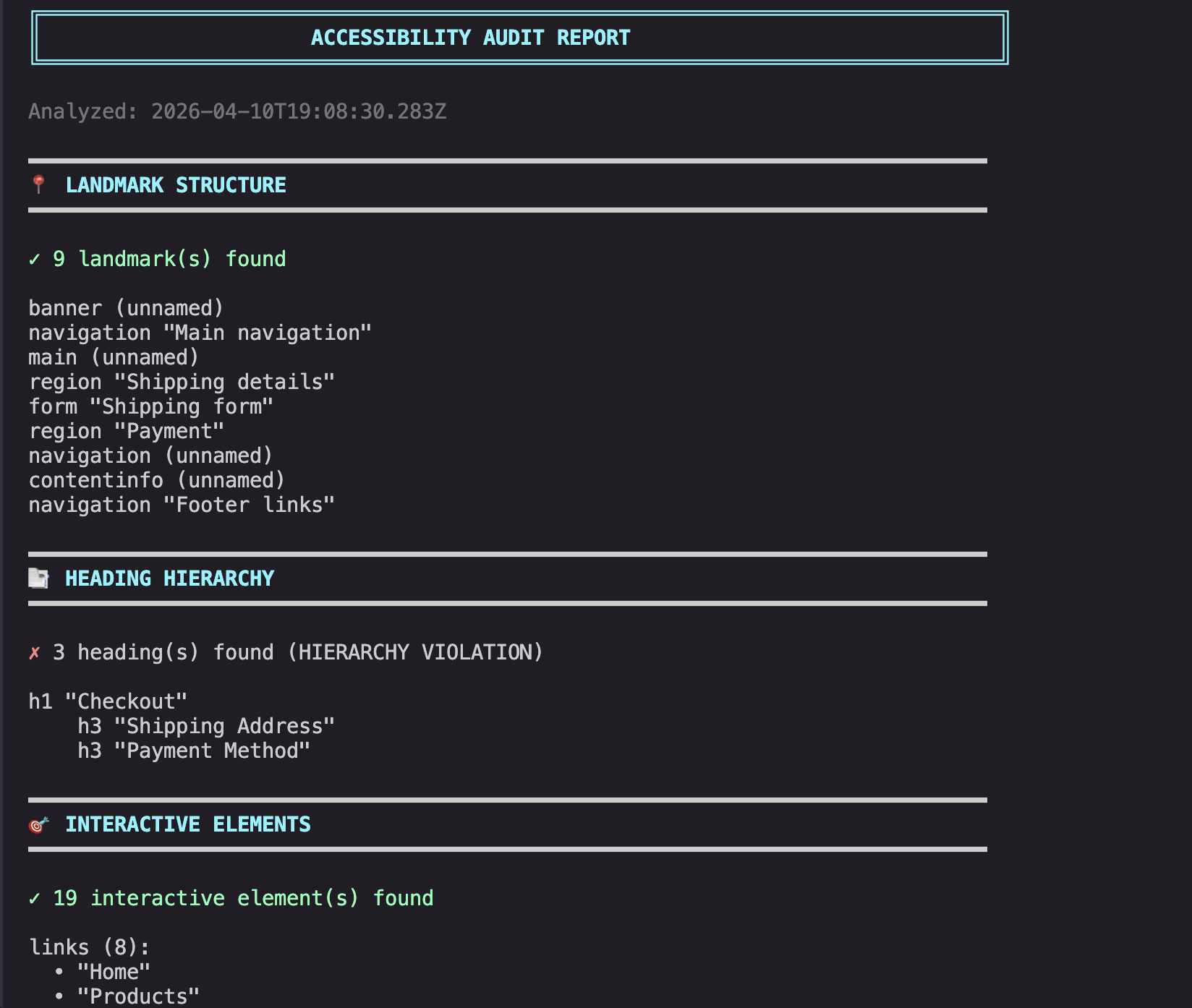
Generate detailed audit reports aligned with WCAG guidance. Each report surfaces landmark issues, heading hierarchy problems, and missing accessible names with actionable remediation steps.
Semantic Diff
Compare before and after HTML to catch accessibility regressions early. See how DOM changes affect screen reader output before merging.
Runtime Accessibility Analysis
Go beyond static markup. Track focus movement, announcements, and state changes during component interaction. Detect regressions in accessibility behavior across builds with Storybook integration.
How Speakable fits into your workflow
Bridge the gap between code and accessibility by embedding screen reader simulation directly into your existing development lifecycle.
Local Development
Run Speakable against your HTML locally to preview screen reader output before committing. Catch issues at the source.
Pull Requests
Regression detection via semantic diff. Catch accessibility changes in code review before they merge.
CI/CD Pipelines
Automated checks running Speakable in build pipelines, failing builds on regressions to maintain quality.
Ongoing Monitoring
Prevent regressions over time. Maintain accessibility standards across every production release.
$ speakable diff-after.html --diff diff-before.html=== Accessibility Tree Diff ===Total: 26 changes +4 added -10 removed ~12 changed~~ cart link: name "Cart" → "Shopping cart, 3 items"~~ heading: level 3 → level 2 (hierarchy fixed)~~ image: alt "" → "Black wireless over-ear headphones"~~ form: name "" → "Add to cart"~~ button: "Add to Cart" → "Add to Cart — $299"~~ input: required added++ button "Save to wishlist" (new)++ link "Accessibility" in footer nav-- section "Customer Reviews" lost aria-label-- footer nav lost landmark role
Speed up Reviews
Instead of manual inspection, let Speakable generate a semantic diff. See how the screen reader experience changes between versions.
Speakable complements manual screen reader testing — it doesn't replace it. Use it to catch issues early and reduce the manual testing burden.
Built to support accessibility workflows at scale
Screen reader usability issues are a leading cause of accessibility complaints. Speakable's CLI integrates directly into your CI/CD workflows, helping teams identify these issues earlier in development — across your entire application.
- Zero-latency local simulation engine
- Batch processing across entire codebases
- Regression detection via semantic diffing
Shared standards
Everyone validates against the same simulation. No more "it works on my machine" accessibility discrepancies across different developer environments.
Consistent validation
Identical checks run locally in the CLI, during PR reviews, and within your CI/CD pipelines for end-to-end reliability.
Reduced regressions
Catch screen reader issues before they compound in large codebases. Maintain accessibility health as your engineering org scales.
Workflow integration
Native support for PR reviews and automated build pipelines with centralized team dashboards for organization-wide visibility.
Built for teams, not just individuals
Establish shared accessibility standards and ensure consistent validation across your entire engineering organization.
Why screen reader issues matter
Screen reader usability issues are among the most common sources of accessibility failures on the web. These issues often go undetected until late in development — or until users report them.
Manual screen reader testing is time-consuming and difficult to scale across large applications. Speakable helps teams identify these issues earlier in the development cycle, before they reach production.
With growing accessibility expectations under laws like the ADA, early detection isn't just good practice — it's risk mitigation.
Manual testing is a bottleneck.
Standard accessibility tools catch syntax, but miss user experience. Automated simulation bridges the gap between raw code and real human interaction.
<button aria-label="Submit Payment">Pay</button>Same markup. Four different screen reader experiences. Speakable shows you all of them.
Ready to improve your accessibility workflow?
Catch screen reader issues early, prevent regressions, and build better experiences for assistive technology users.